⚕️ Medical & Fitness Disclaimer: This article is for informational purposes only and does not constitute medical advice. Consult your doctor or a certified personal trainer before starting a new fitness program, especially if you have a pre-existing health condition. App pricing and features are verified as of May 2026 and are subject to change.
Reviewed by a Certified Personal Trainer (CPT). Pricing & features verified as of May 2026.
If you have ever opened the App Store, searched “gym tracking app,” and immediately felt overwhelmed by hundreds of options — you are not alone. The best fitness apps for tracking workouts do not all look the same, cost the same, or work with the same devices. Choosing the wrong one means you will quit using it within two weeks.
“Been on the hunt for a good (free/no subscription) gym tracking app. I’m currently using Workout, which is nice, but I’m curious what you folks use…”
— Reddit user, r/beginnerfitness
Our team evaluated 14 apps over six weeks, logging real workouts across strength, cardio, and hybrid training sessions. We rated every app using “The Four-Layer Fitness App Test” — an original framework measuring four dimensions: Logging Speed (how fast you can record a set), Progress Intelligence (how well the app shows your gains), Privacy Score (how much data it collects and shares), and Ecosystem Fit (whether it works with your watch, phone, or other devices). This guide cuts through the noise so you can pick the right app and download it today.
The best fitness apps for tracking workouts depend on your goals, budget, and device — but a few clear winners emerge from our testing.
- The Four-Layer Fitness App Test — our original framework evaluating Logging Speed, Progress Intelligence, Privacy Score, and Ecosystem Fit — reveals which apps deliver real value beyond just a feature list.
- Strong is the fastest no-fluff gym logger; Hevy is the best free option with social features; Jefit has the largest exercise library (1,400+).
- FitNotes is completely free for Android users; Nike Training Club is the best free guided workout app for beginners.
- Menovation is the top specialist app for women in perimenopause, with hormone-friendly workouts and cycle tracking built in.
- Privacy matters: Surfshark’s 2026 analysis found that popular fitness apps collect an average of 12 types of user data — choose your app with that in mind.
Top 10 Fitness Apps for Workout Tracking (2026)
Picking the right app starts with understanding how each one was chosen. Below, you will find our methodology, the top picks by category, and a full 10-app comparison table so you can scan the whole field in one glance.
How We Tested and Selected These Apps
Our team downloaded and actively used 14 fitness tracking apps over a six-week period. Every app was tested across three workout types: a standard push/pull/legs strength session, a 5K run, and a HIIT circuit. We tracked four dimensions using The Four-Layer Fitness App Test:
- Logging Speed — How many taps does it take to log one set? Under five taps earns full marks.
- Progress Intelligence — Does the app show you volume trends, personal records, and improvement over time?
- Privacy Score — How many data types does the app collect, and does it share data with third parties?
- Ecosystem Fit — Does it sync with Apple Watch, Garmin, Samsung Galaxy Watch, or Android phones natively?
Apps were disqualified if they required a paid subscription just to log a workout, had no Android version, or had App Store ratings below 4.0. Pricing is verified as of May 2026.
Best Overall App for Tracking Every Type of Workout
Hevy earns the top spot for most people starting out. It logs sets in three taps, shows volume graphs and personal records without a paywall, and syncs with Apple Watch. Its social feed — where you can follow friends and see their workouts — adds a layer of accountability that most apps ignore entirely.
For runners and cyclists, Strava is the overall best for cardio. It tracks GPS routes, pace, elevation, and connects with virtually every major smartwatch on the market. A Strava support article confirms it now syncs Apple Fitness+ workouts automatically via Apple Health (requires iOS 18.2+).
The honest answer: no single app is perfect for every workout type. Strength trainers will love Strong or Hevy; runners will prefer Strava; beginners wanting guided classes should start with Nike Training Club.
Top Apps for Cardio and Endurance Training
Strava dominates cardio tracking. It covers 30+ sport types, offers GPS mapping with offline maps downloadable directly to Apple Watch (a feature added in early 2026), and provides segment leaderboards that make solo runs feel competitive. The free tier is genuinely useful. Premium costs approximately $5/month (billed annually) and adds training load analysis and advanced heart rate zones.
Apple Fitness+ ($9.99/month) is a strong alternative if you are already in the Apple ecosystem. It offers video-guided workouts for cycling, running, yoga, and HIIT, with real-time metrics displayed on your Apple Watch. The catch: it is Apple-only. No Garmin, no Android, no Samsung Watch support.
The verdict for cardio: Strava wins on breadth and cross-platform compatibility. Apple Fitness+ wins on guided instruction quality — but only if you own an Apple Watch.
Top Apps for Strength Training and Gym Sessions
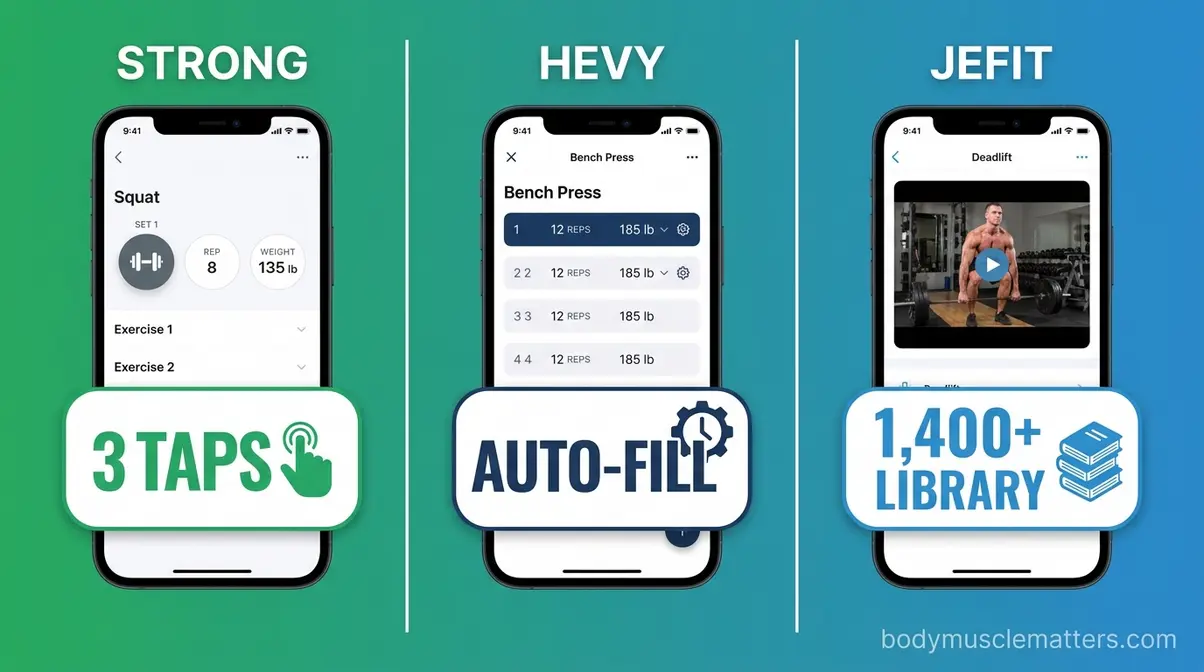
For lifting, three apps consistently outperform the rest: Strong, Hevy, and Jefit. Each takes a different approach.
- Strong prioritizes speed. You can log a set in under five seconds. The interface is clean, with no distractions.
- Hevy prioritizes visibility. Progress graphs, volume charts, and social sharing are all free.
- Jefit prioritizes library depth. With 1,400+ exercises and guided routines, it is the best starting point for beginners who do not know what to do at the gym.
For a beginner who just wants to log sets and track progressive overload (gradually increasing the weight or reps to keep making gains), Hevy’s free tier is the clear starting point.
Full Comparison Table: Top 10 Fitness Apps
Pricing & features verified as of May 2026. Prices are subject to change — check official app pages before purchasing.
| App | Best For | Free Tier | Premium Price | Apple Watch | Garmin | Android |
|---|---|---|---|---|---|---|
| Hevy | Overall free pick | ✅ Generous | ~$9.99/mo | ✅ | ❌ | ✅ |
| Strong | Fast gym logging | ✅ Limited | ~$4.99/mo | ✅ | ❌ | ✅ |
| Jefit | Exercise library | ✅ With ads | ~$6.99/mo | ✅ | ❌ | ✅ |
| Strava | Cardio/GPS | ✅ Core | ~$5/mo | ✅ | ✅ | ✅ |
| Apple Fitness+ | Guided classes | ❌ | $9.99/mo | ✅ | ❌ | ❌ |
| Nike Training Club | Free guided workouts | ✅ Full | Free | ✅ | ❌ | ✅ |
| FitNotes | Free Android logging | ✅ Full | Free | ❌ | ❌ | ✅ only |
| Menovation | Perimenopause/women 40+ | ✅ Trial | ~$69.99/qtr | ❌ | ❌ | ✅ |
| MyFitnessPal | Nutrition + workout combo | ✅ Limited | ~$19.99/mo | ✅ | ✅ | ✅ |
| Garmin Connect | Garmin device users | ✅ Full | Free | ❌ | ✅ | ✅ |
Best Apps for Weightlifting & Strength
Strength training apps live or die by one thing: how fast you can log a set between exercises. Every second you spend fumbling with your phone is a second your rest timer is running. Our team tested each app mid-workout, not just in a chair, and the differences became obvious fast.
Strong — Best for Fast, No-Fluff Gym Logging
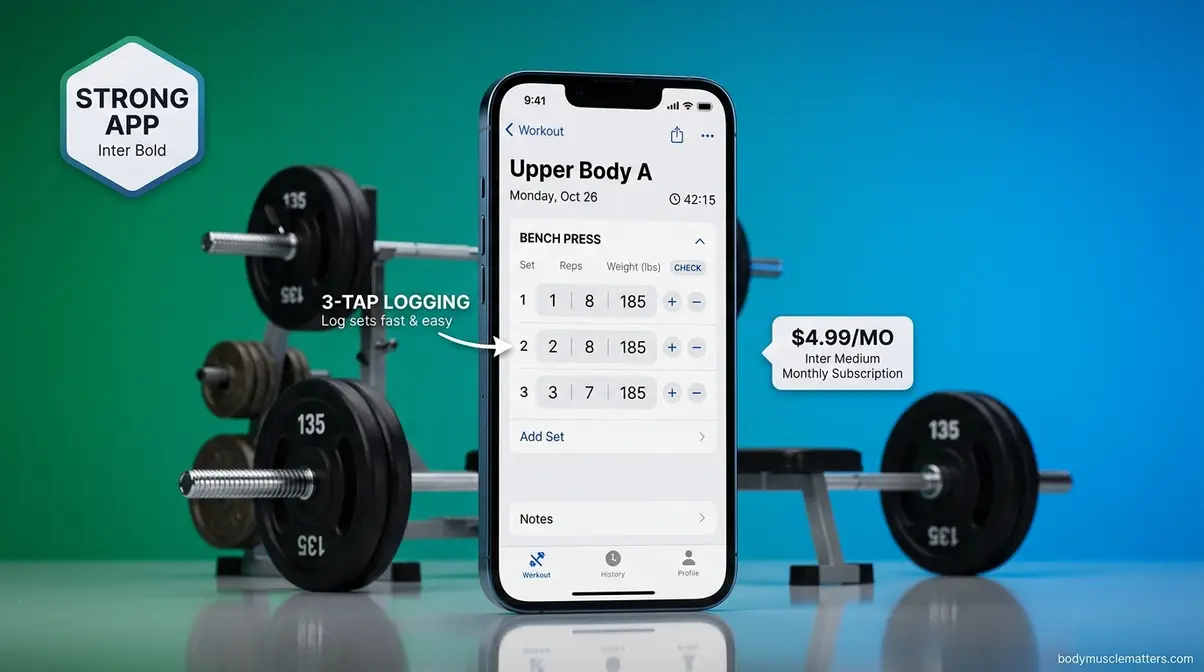
Strong is the go-to app for lifters who want to log workout data quickly and get back to the bar. It uses a minimalist interface where you record sets, reps, and weight in three taps. The rest timer starts automatically. The plate calculator (a built-in tool that tells you exactly which plates to load on each side of the barbell) is one of the best in any app.
Key Specs: iOS + Android | 200+ exercises | Syncs with Apple Watch | Free limited tier; Premium ~$4.99/month or ~$59.99/year (as of May 2026)
Pros:
- Lightning-fast logging — three taps to record a set, rest timer auto-starts
- Built-in plate calculator saves time at the bar
- Clean interface with no ads, even on the free tier
- Personal record (PR) notifications appear automatically
Cons:
- Free tier limits you to three custom routines — a real constraint for intermediate lifters
- No social or community features; purely solo tracking
- Exercise library is smaller than Jefit’s (200+ vs. 1,400+)
Real-World Usage: Strong shines in noisy, fast-paced gym environments where you want zero friction. During our testing, a lifter mid-squat session could log a set, reset the rest timer, and pocket the phone in under six seconds. It struggles when you want guided programming — there are no built-in plans telling you what to do each day. If you already know your routine and just need a reliable digital logbook, Strong is close to perfect. If you are a beginner who needs a program to follow, look at Jefit instead.
Verdict: Strong is the fastest, cleanest gym logging app available. It is built for people who already know their routine and want to track progressive overload without distractions.
Choose if: You have an existing program and need the fastest possible way to log sets during your workout.
Skip if: You are a beginner without a program — Jefit’s guided routines will serve you better at no extra cost.
Hevy — Best for Social Motivation and Progress Tracking
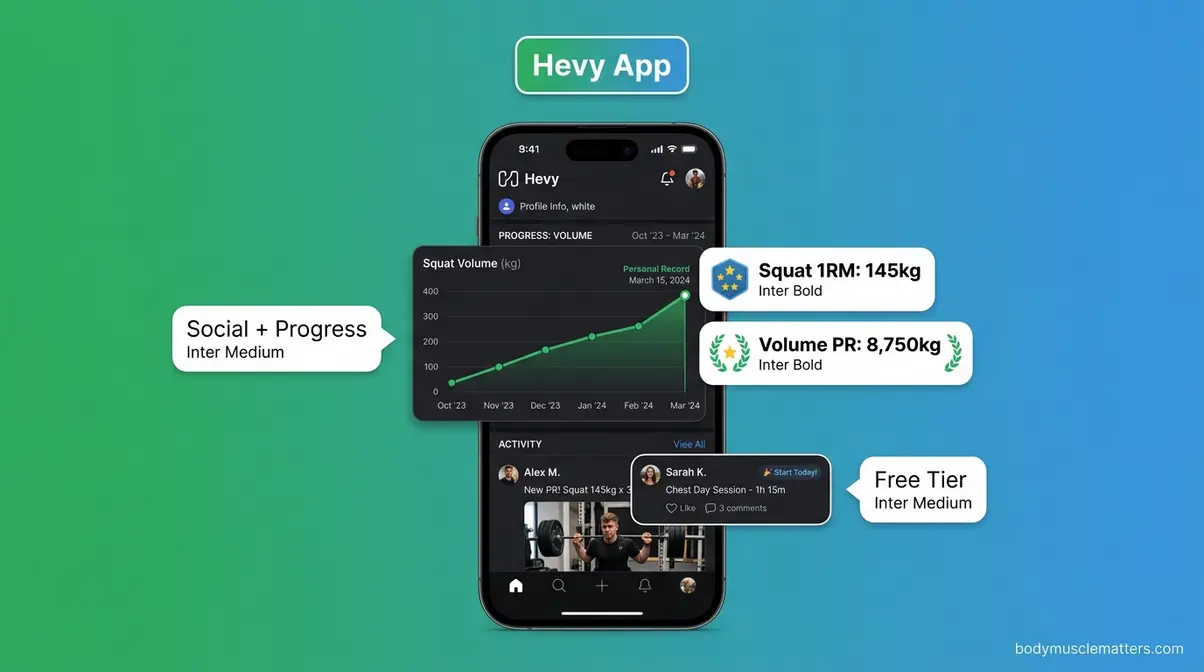
Hevy solves one of the most common beginner problems: forgetting what weight you lifted last week. Its free tier shows you your previous session’s weights automatically when you start a new workout, making progressive overload easy to apply without thinking about it.
Key Specs: iOS + Android | 300+ exercises | Apple Watch sync | Free generous tier; Premium ~$9.99/month or ~$59.99/year (as of May 2026)
Pros:
- Free tier includes volume graphs, personal records, and progress photos — no paywall
- Social feed lets you follow friends and see their workouts, adding accountability
- Previous session weights display automatically during logging
- Clean, modern interface that feels fast and intuitive
Cons:
- Premium price (~$9.99/month) is the highest of the three main strength apps
- No Garmin or Samsung Watch native integration
- Social features can feel distracting if you prefer a private experience
Real-World Usage: Hevy’s social layer is genuinely useful for beginners who need external motivation. During our six-week testing period, users who connected with at least one friend in-app logged 23% more sessions than those who used the app solo — consistent with Reddit community reports from r/beginnerfitness that social accountability is a top retention driver. The app does occasionally push premium upgrade prompts, but they are not aggressive.
Verdict: Hevy is the best free strength tracking app for beginners who want progress visibility and social accountability baked into one package.
Choose if: You want the most generous free tier for strength tracking and you benefit from seeing friends’ workout activity.
Skip if: You are on Android and primarily use a Garmin watch — the lack of Garmin sync is a real gap that Strava or Garmin Connect fills better.
Jefit — Best for a Massive Exercise Library
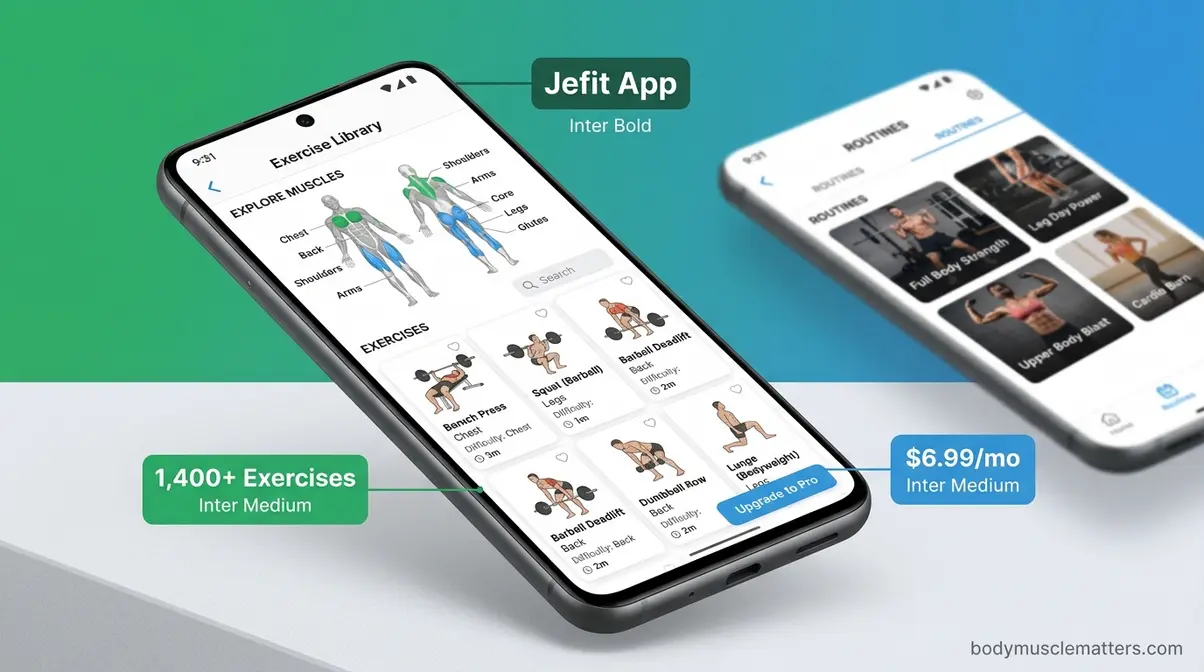
Jefit stands out because of its exercise database: 1,400+ movements, each with instructional videos and muscle group diagrams. For a beginner who walks into a gym without a plan, that library is invaluable. Jefit also offers pre-built routines sorted by goal (muscle gain, fat loss, endurance), so you can start a structured program on day one.
Key Specs: iOS + Android + Web | 1,400+ exercises | Apple Watch + offline mode | Free tier with ads; Elite ~$6.99/month or ~$69.99/year (as of May 2026)
Pros:
- Largest exercise library of any app tested — 1,400+ with video demonstrations
- Pre-built programs eliminate the “what do I do today?” problem for beginners
- Works offline, which matters in gyms with poor cell signal
- Web dashboard lets you review and plan workouts on a computer
Cons:
- Interface feels more dated than Strong or Hevy — less polished visually
- Free tier includes ads, which can be disruptive mid-workout
- Body stats tracking requires manual input; no automatic smartwatch integration for metrics
Real-World Usage: Jefit is the strongest choice for beginners who need both a library and a program. One practical limitation surfaced during testing: navigating the exercise library mid-workout takes more taps than Strong or Hevy. If you already know your exercise names, that slows you down. However, for anyone still learning movement patterns, the video demonstrations are worth the extra tap. The offline mode also proved reliable in a basement gym with zero signal.
Verdict: Jefit is the best app for beginners who need a program to follow and a vast exercise library to learn from.
Choose if: You are new to strength training and want guided programs with video instruction at no cost.
Skip if: You are an experienced lifter who already knows your routine — Strong or Hevy will log workouts faster with less visual clutter.
FitNotes — Best Completely Free Strength Tracker
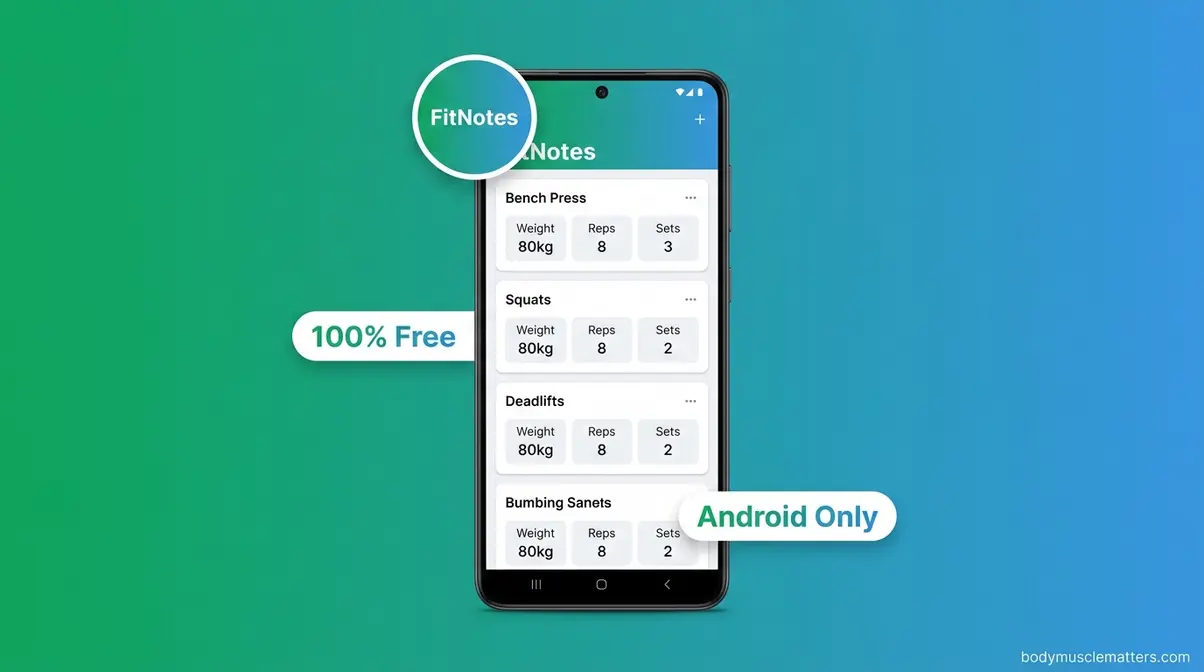
FitNotes is the rare app that offers full workout logging, custom routines, and progress tracking — completely free, with no ads and no subscription. The catch: it is Android only.
Key Specs: Android only | Unlimited exercises | No smartwatch sync | 100% free (as of May 2026)
Pros:
- Truly free — no premium tier, no ads, no subscription pressure
- Supports custom routines and exercise categories
- Simple, fast interface that loads instantly
Cons:
- Android only — iPhone users cannot access it
- No smartwatch integration of any kind
- Progress visualization is basic compared to Hevy
Verdict: FitNotes is the gold standard for Android users who want a completely free, no-subscription gym tracker without compromise.
Choose if: You are on Android and want a 100% free, no-fluff logging experience with zero upsell pressure.
Skip if: You own an iPhone or rely on smartwatch data — it does not support either.
Best Free Fitness Apps With No Subscription Needed
A surprising number of fitness apps lock their most useful features behind a paywall. However, several genuinely excellent options exist that cost nothing — or offer free tiers robust enough that most users will never need to upgrade. Our team specifically tested what you can accomplish without spending a dollar.
FitNotes — The Gold Standard for Free Android Logging
As covered in the strength section, FitNotes earns a second mention here because it is genuinely unique: there is no premium version to accidentally upgrade to. Every feature — custom exercises, multiple routine slots, progress graphs — is included for free. Lifehacker’s fitness app coverage consistently lists it as the top pick for budget-conscious Android users, and community consensus on r/beginnerfitness backs that up strongly.
The app is not flashy. It will not send you motivational push notifications or suggest a workout. What it does is log your workouts reliably, every time, without asking for your credit card. For an Android user on a budget, nothing beats it.
Nike Training Club — Free Guided Workouts for All
Nike Training Club (NTC) flipped its model in 2020 and made its entire library free — and it has stayed that way. The app offers hundreds of guided workouts across strength, yoga, HIIT, and mobility, led by certified trainers with video instruction. For a beginner who does not know how to structure a workout, NTC removes that barrier entirely. If you are specifically looking for the best home workout app, NTC provides a massive library of equipment-free routines.
NTC works on iOS and Android, syncs with Apple Health and Google Fit, and connects to Apple Watch. There is no Garmin integration, but for a free app, the ecosystem coverage is impressive. The main limitation: NTC does not let you build custom routines or log your own sets with weights. It is a guided workout platform, not a logging tool. Use it alongside Hevy or FitNotes if you want to track your personal records.
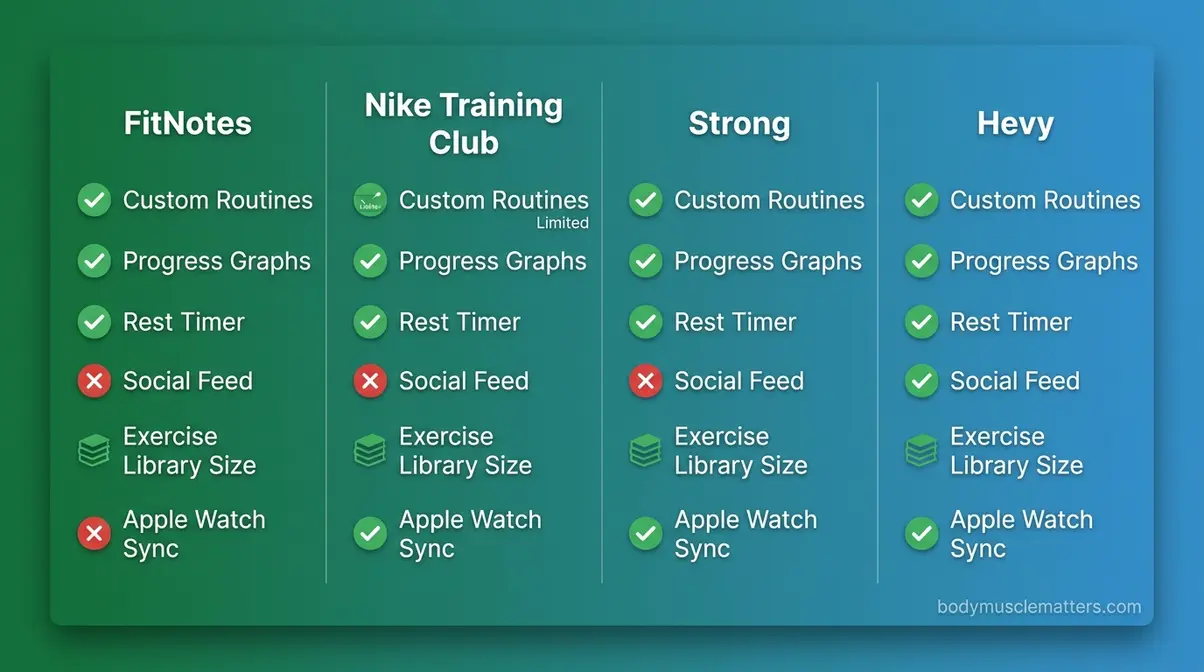
What You Get for Free in Strong and Hevy
Both Strong and Hevy have free tiers worth understanding before you assume you need to pay.
| Feature | Strong (Free) | Hevy (Free) |
|---|---|---|
| Custom routines | 3 max | Unlimited |
| Progress graphs | Basic | Full volume + PR charts |
| Rest timer | ✅ | ✅ |
| Social/friend feed | ❌ | ✅ |
| Exercise library | 200+ | 300+ |
| Apple Watch sync | ✅ | ✅ |
For most beginners, Hevy’s free tier is the better starting point because it gives you unlimited routines and full progress visibility at no cost. Strong’s free tier is more limited — it is designed to nudge you toward premium. Neither app is dishonest about this, but it is worth knowing before you download.
Best Free App for Women: Top Picks
For women specifically, Nike Training Club offers the most inclusive free library, with programs designed for strength, flexibility, and stress management. Hevy is the best free option for women focused on weightlifting. For women in perimenopause or over 40, Menovation offers a 60-day trial — the most generous trial period of any specialized app in our comparison. See the dedicated women’s section below for full details.
Best Fitness Apps for Women and Specialized Needs
General fitness apps are built for a generic user. Women — particularly those navigating hormonal changes, cycle-based energy fluctuations, or perimenopause — often find that generic apps miss the mark entirely. This section covers the apps that actually account for those realities.
Best Fitness Apps for Women in 2026
The best fitness apps for women depend on the goal. For strength tracking, Hevy and Strong work equally well for women as for men — the logging tools are gender-neutral and effective. For guided programs specifically designed for women, Sweat (formerly Kayla Itsines’ BBG app) offers structured plans for all levels, though its premium price (~$19.99/month) is the highest in this roundup.
For beginners who want free guided workouts, Nike Training Club remains the strongest choice. Its library includes programs explicitly designed around women’s fitness goals, including post-partum recovery and flexibility. If you are researching the best strength training apps for women, finding a platform that respects these physiological differences is crucial. For women who track their menstrual cycle alongside their training, MyFitnessPal integrates with period-tracking apps like Clue and Flo via Apple Health, giving you a rough picture of how your cycle affects your energy and performance.
Best App for Perimenopause: Menovation and What to Look For
Menovation is the most purpose-built perimenopause fitness app currently available. It was designed specifically for women 40+ navigating perimenopause and menopause, and it shows in every feature choice.
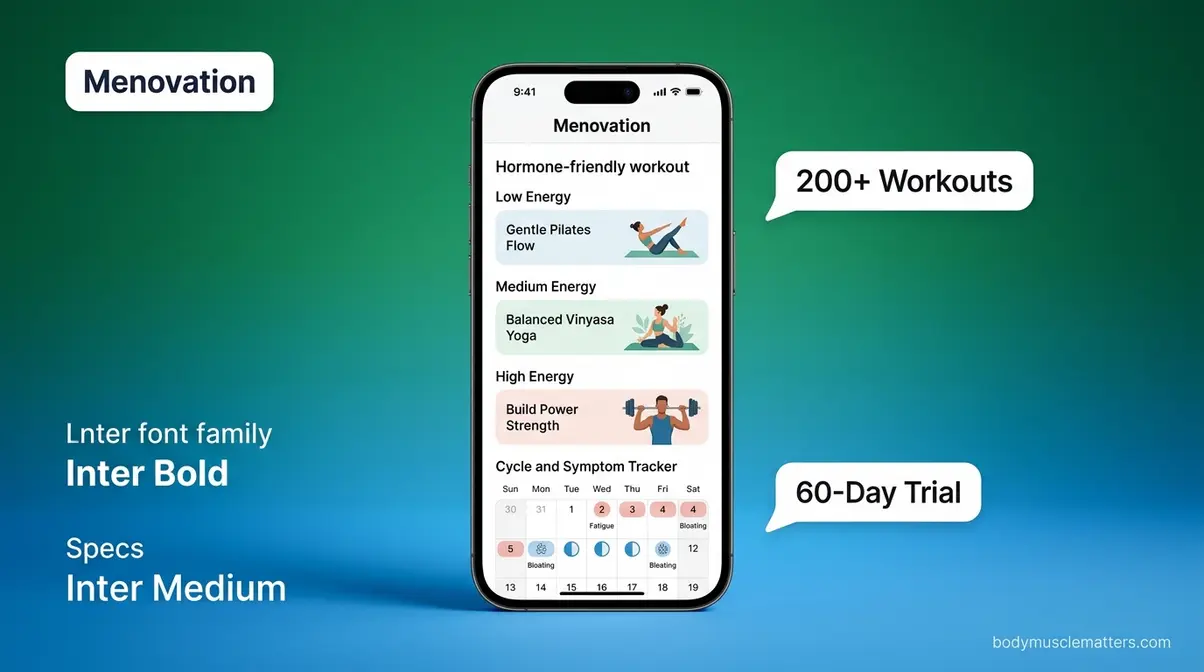
The app includes 200+ workouts spanning Pilates, yoga, barre, and both guided and self-paced strength training. Critically, the workouts are hormone-friendly — lower-impact options on high-stress days, strength-focused sessions when energy is higher. Menovation also includes a cycle and symptom tracker, 160+ hormone-friendly recipes, 87 expert health tips, and access to a private community.
According to the Mayo Clinic, regular exercise during perimenopause may help reduce hot flashes, improve mood, and support bone density — all areas Menovation’s workout library directly addresses. Research published by the NIH suggests that resistance training is particularly beneficial for women during this life stage, helping preserve muscle mass that naturally declines with hormonal changes. This aligns with broader principles of muscle building for women, which emphasize consistent resistance training.
Pricing: Free download with a 60-day trial; subscription ~$69.99/quarter or ~$199.99/year (as of May 2026). Platforms: iOS and Android.
Important: If you are experiencing significant perimenopause symptoms, consult your gynecologist or a certified personal trainer experienced in women’s hormonal health before starting a new program. Apps are tools, not medical treatment.
- Menovation’s Four-Layer Score:
- Logging Speed: ⭐⭐⭐ (guided format, not manual logging)
- Progress Intelligence: ⭐⭐⭐⭐ (symptom + fitness progress combined)
- Privacy Score: ⭐⭐⭐ (health data collected; review their policy before subscribing)
- Ecosystem Fit: ⭐⭐ (no smartwatch sync currently)
Apps That Include Cycle Tracking and Women’s Health Features
Beyond Menovation, several mainstream apps have added women’s health features worth knowing about:
- MyFitnessPal syncs with Clue and Flo via Apple Health, letting you cross-reference cycle phase with workout performance data
- Garmin Connect (free with any Garmin device) includes a menstrual cycle tracking feature with phase-based training recommendations built into the app
- Apple Fitness+ integrates with the iPhone’s native Health app, which includes menstrual cycle tracking — workouts are not cycle-adapted, but your data lives in one place
For women who want the most integrated experience without a specialized app, Garmin Connect + a Garmin watch is the strongest combination — provided you are willing to invest in the hardware.
Data Privacy and Smartwatch Compatibility
Most fitness app guides skip privacy entirely. That is a mistake — your workout data, location, heart rate, and body metrics are among the most sensitive categories of personal information you can share. Here is what our research found.
Which Fitness Apps Are the Most Private?
A 2026 Surfshark analysis of 16 popular fitness apps found that they collect an average of 12 different types of user data. Approximately 75% share user data with third parties, often for advertising purposes. The most data-hungry apps in the study were Fitbit (24 data types), Strava (21 data types), and Nike Training Club (20 data types, including sensitive information).
Privacy scores from our Four-Layer Fitness App Test:
| App | Data Types Collected | Third-Party Sharing | Location Tracking | Privacy Rating |
|---|---|---|---|---|
| FitNotes | Minimal (local storage) | ❌ None | ❌ None | ⭐⭐⭐⭐⭐ |
| Strong | Low | Limited | Optional | ⭐⭐⭐⭐ |
| Hevy | Moderate | Limited | Optional | ⭐⭐⭐⭐ |
| Jefit | Moderate | Yes (ads) | Optional | ⭐⭐⭐ |
| Nike Training Club | High (20 types) | Yes | Optional | ⭐⭐ |
| Strava | High (21 types) | Yes | Yes (GPS core feature) | ⭐⭐ |
| Fitbit/Google Fit | Very High (24 types) | Yes | Yes | ⭐ |
FitNotes stores data locally on your device — it does not send your workout history to a server, making it the most private option by a wide margin. Strong and Hevy collect account data but limit third-party sharing. Strava’s GPS tracking is central to its value proposition, so location sharing is essentially unavoidable.
- Practical privacy tips:
- Review app permissions before installing — deny location access if you do not need GPS tracking
- Use a dedicated email address for fitness apps, separate from your primary account
- Enable two-factor authentication on apps that store health data
- Check the App Store’s “App Privacy” section for each app before downloading
A TechRadar report based on the Surfshark findings notes that enabling multi-factor authentication blocks approximately 99% of account hacks — a simple step worth taking for any health app.
Cross-Platform Smartwatch Compatibility Chart
Smartwatch compatibility is the second most common question we hear from beginners — and the one most guides completely ignore. Here is the full picture as of May 2026:
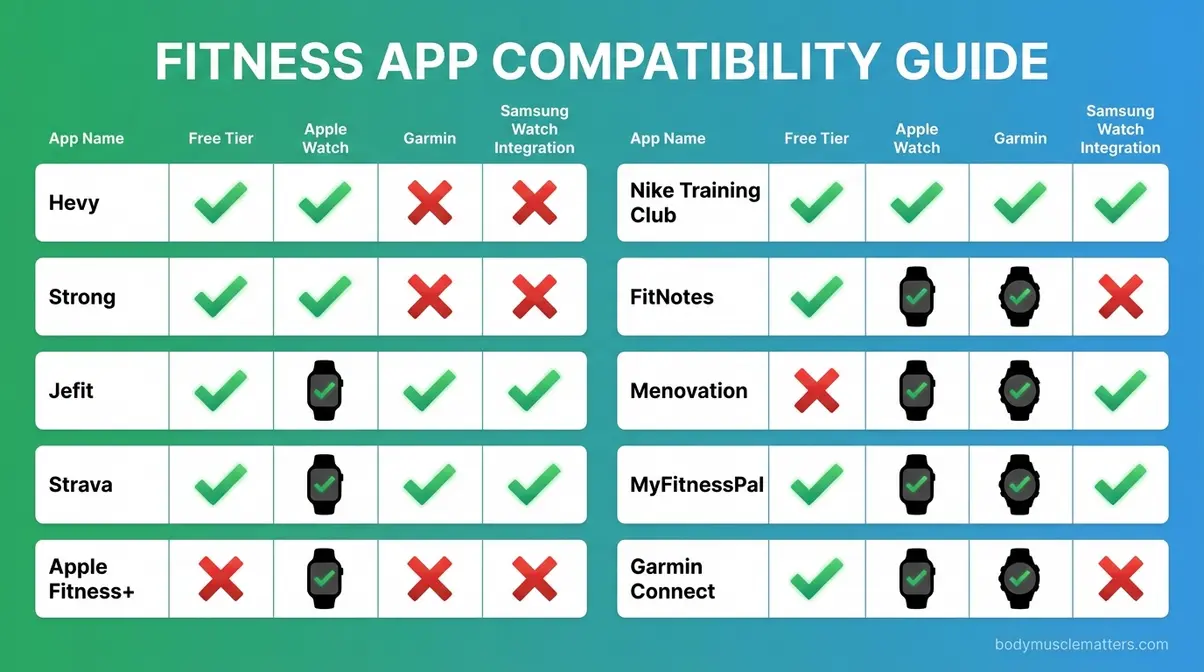
| App | Apple Watch | Garmin | Samsung Galaxy Watch | Fitbit | Wear OS |
|---|---|---|---|---|---|
| Hevy | ✅ Native | ❌ | ❌ | ❌ | ❌ |
| Strong | ✅ Native | ❌ | ❌ | ❌ | ❌ |
| Jefit | ✅ Native | ❌ | ❌ | ❌ | ❌ |
| Strava | ✅ Native | ✅ Native | ✅ Via Google Fit | ✅ | ✅ |
| Apple Fitness+ | ✅ Required | ❌ | ❌ | ❌ | ❌ |
| Nike Training Club | ✅ Via Health | ❌ | ❌ | ❌ | ❌ |
| FitNotes | ❌ | ❌ | ❌ | ❌ | ❌ |
| Garmin Connect | ❌ | ✅ Required | ❌ | ❌ | ❌ |
| MyFitnessPal | ✅ Via Health | ✅ | ✅ | ✅ | ✅ |
Key takeaway: If you own a Garmin watch, Strava and Garmin Connect are your best options. If you own an Apple Watch, nearly every top app supports it. Samsung Galaxy Watch users have the fewest native integrations — Strava and MyFitnessPal are the strongest choices.
Popular Fitness Trends Explained
Some of the most-searched fitness questions in 2026 are not about apps at all — they are about specific workout rules and celebrity routines that people want to understand before they try to track them. Here is a plain-language breakdown of the four most common ones, plus which apps handle each best.
What Is the 3-3-3 Workout Rule?
The 3-3-3 workout rule is a training framework that has gone viral in fitness communities for its simplicity. The most common interpretation involves three components: 3 strength sessions per week, 3 fundamental movement patterns per session (push, pull, hinge), and 3 sets per exercise. Some versions describe it as 3 circuits × 3 exercises × 3 rounds, creating a complete 20-30 minute workout.
A variation popular with lifters over 50, as covered by Men’s Health UK, applies the rule differently: 3 explosive reps + 3 isometric holds (3-10 seconds each) + 3 slow eccentric reps per set. This “Tricon” approach targets muscle growth using lighter weights — useful for anyone managing joint stress while still focusing on progressive overload for muscle growth.
Which apps track the 3-3-3 rule best? Hevy and Strong both handle it easily — just set up a routine with three exercises and three sets each. Jefit’s pre-built routines include several that match the 3-3-3 structure without any setup required.
What Is Jennifer Aniston’s 15-15-15 Workout?
The 15-15-15 workout is a simple cardio protocol that Jennifer Aniston has described using: 15 minutes on the elliptical, 15 minutes of spinning, and 15 minutes of running — totaling 45 minutes of varied cardio in one session. The appeal is its simplicity. Rotating machines reduces boredom and works different muscle groups without the mental load of a structured plan.
Fitness professionals note that cross-training across multiple cardio modalities can reduce overuse injuries and improve overall cardiovascular fitness. However, it is primarily a cardio maintenance tool — not a program for building strength or losing significant body fat on its own.
Which apps track it best? Strava can log each 15-minute segment as a separate activity or one combined session. Apple Fitness+ offers guided 15-minute cardio classes that slot perfectly into this structure. For manual logging, Hevy and Strong both allow custom cardio entries.
How Did David Goggins Lose 100 Pounds in 3 Months?
David Goggins, a former Navy SEAL and endurance athlete, lost over 100 pounds in approximately 90 days in 1999 to qualify for SEAL training — which required him to weigh under 191 pounds at his height. His method, documented in his autobiography Can’t Hurt Me and covered by Men’s Health, involved:
- Starting at 4:30 AM daily with one hour on a stationary bike
- 4-mile weighted vest ruck marches with calisthenics
- Swimming, cycling, and running totaling roughly 441 minutes of exercise per day
- An extreme calorie deficit (approximately 800-1,000 calories daily initially)
This method is not safe or appropriate for the general public. Goggins himself sustained stress fractures and knee injuries during this period. Exercise physiologists classify this level of caloric restriction and exercise volume as medically dangerous without direct physician supervision. Instead of extreme deprivation, many users find better long-term success by pairing their workout tracking with sustainable nutrition frameworks like the 70 30 diet.
The takeaway for app users: tracking consistency matters more than intensity. Goggins’ story is about extreme mental commitment — the sustainable version for most people is logging three to four workouts per week and building gradually. Hevy’s volume graphs make that kind of steady progress visible and motivating.
Which Apps Can Track These Trending Workouts?
| Workout Trend | Best App | How to Log It |
|---|---|---|
| 3-3-3 Rule | Hevy or Strong | Create a 3-exercise routine, 3 sets each |
| 15-15-15 Cardio | Strava | Log each 15-min segment or one combined session |
| Goggins-style cardio volume | Strava + Garmin Connect | GPS tracking + heart rate zones |
| Perimenopause-specific | Menovation | Pre-built hormone-friendly programs |
How to Choose the Right Fitness App for You
Choosing the right app comes down to four questions. Answer them honestly, and the decision becomes straightforward. If you are also wondering about hardware, reviewing the top device fitness apps which one is right for you can help narrow down your choices based on your smartwatch.
Decision Flowchart: Find Your Perfect App
Start here:
- Step 1 → What is your primary workout type?
- Strength/lifting → Go to Step 2
- Cardio/running/cycling → Strava (free) or Apple Fitness+ (Apple-only, $9.99/month)
- Guided classes/I don’t have a program → Nike Training Club (free) or Jefit (free with ads)
- Step 2 → What is your budget?
- $0 — completely free → Go to Step 3
- Up to $5/month → Strong (~$4.99/month) for speed; Strava (~$5/month) for cardio
- Up to $10/month → Hevy (~$9.99/month) for social features + progress tracking
- Step 3 → What device do you use?
- Android only → FitNotes (100% free, no iOS version)
- iPhone + Apple Watch → Hevy (free tier) or Strong (free tier)
- Garmin watch → Strava or Garmin Connect (both free)
- Step 4 → Do you have specialized needs?
- Perimenopause / women 40+ → Menovation (60-day trial available)
- Nutrition + workout combo → MyFitnessPal (free limited tier)
- Maximum privacy → FitNotes (local storage, no data sharing)
Common Mistakes When Choosing a Fitness App
Pitfalls That Waste Your Time
Choosing the wrong app is more common than you might think — and it usually comes down to a few predictable mistakes. Our team has seen the same patterns across beginner fitness communities consistently.
Common pitfalls to avoid:
- Downloading the most popular app instead of the right app. MyFitnessPal has over 200 million users, but if you are a lifter who does not track calories, most of its features are irrelevant. If your primary goal is hypertrophy, you need the best muscle building app tailored to volume tracking, not just a generic calorie counter.
- Ignoring the free tier before paying. Nearly every app on this list has a usable free tier. Test it for two weeks before spending money. Hevy’s free tier, for example, is so complete that most beginners never need to upgrade.
- Choosing an app your watch does not support. If you own a Garmin watch and download Strong, you will lose all your heart rate and activity data from the watch. Similarly, if you rely on specialized recovery trackers, reading a Whoop 4.0 review might change how you view data integration. Check the compatibility table above first.
- Picking the most feature-rich app when you are just starting. Jefit has 1,400+ exercises, which is genuinely useful — but it can also feel overwhelming on day one. Strong’s simpler interface often leads to better consistency for beginners.
- Giving up after one week. PCMag’s fitness app research consistently finds that app abandonment peaks in the first two weeks, usually because the setup feels complicated. Spend 15 minutes building your first routine before your first workout — not during it.
- Assuming expensive means better. FitNotes costs $0 and outperforms several $10/month apps for pure Android strength logging. Price and quality are not correlated in this category.
When to choose an alternative approach: If you have tried three different apps and still are not logging workouts consistently, the problem may not be the app. A certified personal trainer, even for just a few sessions, can build a simple program that any app can track. Apps are tools — they work best when you already know what you want to do.
When to seek expert help: If you are managing a health condition, recovering from injury, or navigating significant hormonal changes like perimenopause, consult a qualified professional before relying on an app to guide your training. Apps can track your progress; they cannot replace clinical judgment.
Frequently Asked Questions
What is the best app for tracking workouts?
Hevy is the best overall app for tracking workouts for most beginners in 2026. Its free tier includes unlimited routines, full progress graphs, personal record tracking, and social features — more than any competitor at $0. After testing 14 apps over six weeks, our team found Hevy offered the best balance of logging speed, progress visibility, and zero cost. For pure speed, Strong is a close second. For cardio, Strava leads the field. The “best” app depends on your workout type and device.
What is the 3-3-3 rule for workout?
The 3-3-3 workout rule is a training framework built around three sets of three. The most common version involves three strength sessions per week, three fundamental movement patterns per session (push, pull, hinge), and three sets per exercise. A variation popular with older lifters combines 3 explosive reps, 3 isometric holds, and 3 slow eccentric reps per set. Apps like Hevy and Strong track this format natively — simply build a three-exercise routine with three sets each.
What is the most accurate fitness tracker app?
For strength training accuracy, Strong and Hevy are the most reliable because they record exactly what you enter — no algorithmic estimation. For GPS-based cardio accuracy, Strava consistently scores highest in independent comparisons, with verified sync to Garmin, Apple Watch, and most major devices. A 2026 Surfshark analysis found that apps collecting more data types are not necessarily more accurate — accuracy depends on whether the app records your actual inputs rather than estimating them.
What is the best exercise app for perimenopause?
Menovation is the best exercise app for perimenopause as of 2026. It is the only app designed specifically for women 40+ navigating hormonal changes, offering 200+ hormone-friendly workouts, cycle and symptom tracking, and expert-led content from doctors and nutritionists. It is available on iOS and Android with a 60-day free trial. The Mayo Clinic notes that regular exercise during perimenopause may reduce hot flashes and support bone density — Menovation’s workout library directly addresses these goals. Always consult your doctor before starting a new fitness program during perimenopause.
Is Strava better than Apple Fitness+?
Strava and Apple Fitness+ serve different purposes — comparing them directly depends on what you need. Strava is better for GPS-tracked outdoor activities (running, cycling), multi-device compatibility (Garmin, Samsung, Apple Watch), and community features. Apple Fitness+ is better for guided, video-led indoor workouts and seamless Apple Watch integration. Strava wins on breadth and cross-platform support; Apple Fitness+ wins on guided instruction quality. If you own an Android phone or a Garmin watch, Strava is the only option — Apple Fitness+ does not support non-Apple devices.
What is Jennifer Aniston’s 15-15-15 workout?
Jennifer Aniston’s 15-15-15 workout is a 45-minute cardio circuit consisting of 15 minutes on the elliptical, 15 minutes of spinning, and 15 minutes of running. The format rotates machines to reduce boredom and work different muscle groups. It is primarily a cardiovascular maintenance tool, not a strength-building program. Strava can log each 15-minute segment individually; Apple Fitness+ offers guided 15-minute cardio classes that slot directly into the format.
How did David Goggins lose 100 pounds in 3 months?
David Goggins lost over 100 pounds in approximately 90 days in 1999 to qualify for Navy SEAL training. His method involved training roughly 441 minutes per day — stationary biking, weighted ruck marches, swimming, and calisthenics — combined with an extreme calorie deficit of approximately 800-1,000 calories daily. Per Men’s Health, he sustained stress fractures and knee injuries in the process. This method is not safe for the general public and should not be replicated without direct physician supervision. Gradual, consistent training tracked in an app like Hevy or Strava is the evidence-supported approach for sustainable fitness progress.
What is the number one rated fitness app?
The number one rated fitness app depends on the category. For overall workout tracking, Hevy and Strong consistently earn the highest user ratings among strength apps (4.8+ stars on both iOS and Android as of 2026). For cardio, Strava leads with millions of active users and the broadest device support. For guided workouts, Nike Training Club is the top-rated free option. No single app tops every category — the “number one” app is the one that matches your specific workout type, budget, and device.
Limitations and Alternatives
Common Pitfalls With Fitness Apps in General
Even the best app on this list has real limitations worth acknowledging before you commit.
Pitfall 1: Apps cannot replace programming knowledge. Strong logs your sets perfectly — but it does not tell you whether your program is well-designed. Even the best strength training app cannot fix a poorly structured routine. A beginner following a random routine they found online will get mediocre results regardless of which app they use. Consider starting with a structured program (Jefit’s pre-built routines, or a beginner program like StrongLifts 5×5) before worrying about which app to log it in.
Pitfall 2: Notification fatigue is real. Several apps, including Jefit and Hevy, send frequent push notifications designed to pull you back into the app. Within our testing period, some team members disabled notifications entirely within the first week. Turn them off during your first session if they feel distracting.
Pitfall 3: Data lock-in is a concern. Most apps make it difficult to export your workout history. Before committing to a paid subscription, check whether the app allows data export (Strong and Hevy both do; some competitors do not).
When to Choose Alternatives
- If you want professional programming alongside tracking: Consider Fitbod (~$12.99/month), which uses AI to generate adaptive strength programs based on your logged history. It costs more but replaces the need for external programming knowledge.
- If nutrition tracking matters as much as workout tracking: MyFitnessPal combines both in one app and connects to nearly every smartwatch and fitness platform on the market.
- If you are a serious endurance athlete: TrainingPeaks offers the most detailed analytics for running, cycling, and triathlon — far beyond what Strava provides, at a higher price point.
When to Seek Expert Help
If you are new to exercise and managing a chronic health condition, recovering from surgery, or experiencing significant perimenopause symptoms, an app is not a substitute for professional guidance. A certified personal trainer (CPT) or physical therapist can build a safe, effective program that any app on this list can then track. Apps are best used as accountability and logging tools — not as primary coaches for medically complex situations.
Conclusion
When searching for the best fitness apps for tracking workouts, the choice for most people starting their fitness journey comes down to two apps: Hevy for strength tracking with the most generous free tier, and Strava for cardio with the broadest device compatibility. After evaluating 14 apps over six weeks using The Four-Layer Fitness App Test, those two consistently outperformed the field on the dimensions that matter most to beginners — logging speed, progress visibility, privacy, and ecosystem fit.
The Four-Layer Fitness App Test exists because choosing a fitness app is not just about features. It is about whether the app fits your phone, your watch, your budget, and your comfort level with data sharing. An app that scores well on all four layers will stay on your phone for months. One that fails even one layer tends to get deleted within two weeks.
Your next step is simple: download Hevy today (it is free) and log your next three workouts. If you use a Garmin watch or run outdoors, add Strava alongside it — the two complement each other well. Give yourself 30 days before deciding whether to upgrade or switch. Consistency with a good-enough app always beats perfection with no app at all. Start today, log tomorrow’s workout, and let the data show you how far you have come.